
Knowing your shower's flow rate (how many litres of water come out per minute) is the best way to track your real-world savings.
You don't need a plumber or any fancy tools to do this. You can get an accurate measurement in under two minutes using a simple household measuring jug and your phone.
What you need
- A measuring jug or bucket (with volume markings).
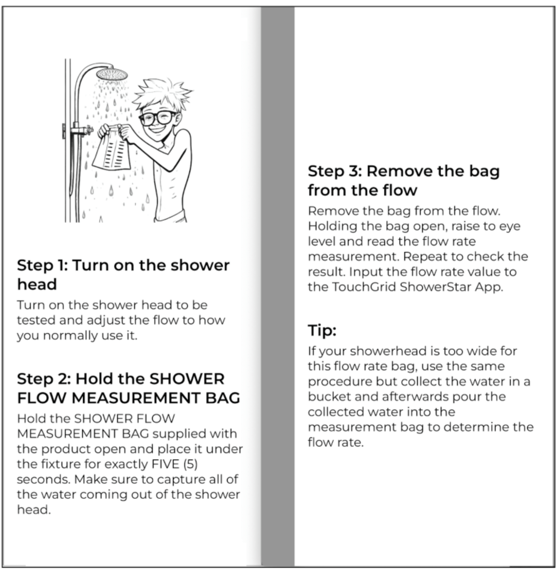
The flow rate bag is included in ShowerStar packaging.
- A stopwatch (or the timer on your phone).
- A calculator.
The 10-Second Bucket Method
Follow these steps to calculate your Litres Per Minute (L/min):
- Turn on your shower. Set it to the temperature and pressure you normally use. This ensures the measurement reflects your actual daily usage.
- Get ready to catch the water. Hold your empty measuring jug or bucket under the showerhead. Make sure you capture the full stream of water.
- Time it for 10 seconds. Start your stopwatch the moment the water hits the bucket. Remove the bucket immediately after 10 seconds pass.
- Check the volume. Place the jug on a flat surface and read the water level. For example, you might have collected 1.5 litres.
- Do the maths. Multiply the amount of water you collected by 6. This gives you the flow rate for a full 60 seconds (one minute).
The Calculation: (Litres collected in 10 secs) x 6 = Flow Rate (L/min)
Example: 1.5 Litres x 6 = 9 Litres per minute
Why is this important?
Most standard showerheads release about 9 litres per minute, but older models can use up to 20 litres.
By entering your specific flow rate into the ShowerStar App settings, your dashboard will show you exactly how much water, energy, and money you are saving. Switching to shorter showers is one of the most impactful ways to conserve resources, potentially saving families $300 to $785 a year.
Need more help?
You can find other ShowerStar support materials, instructions, and videos at theTouchGrid Support Page.